AURA BITCOIN HASH – HOW TO SET UP


Aura BTC Hash – How to test and set up
- Working symbols Bitcoin, BTC, BTCUSD
- Working Timeframe: H1
- Minimum recommended deposit: $100
- Min leverage 1:20
CHOOSE A GOOD BROKER
Not all brokers allow trading bitcoin and not all brokers have good trading conditions and spreads at BTC, I highly recommend using the following brokers to achieve better results TESTING
For faster testing please disable trading panel in settings.
HOW TO SET UP
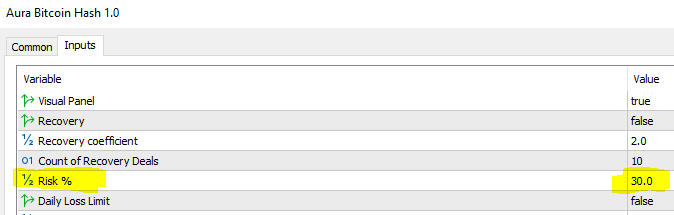
The Expert is easy to use, with all default settings. You only need to select the Risk
Risk Percents – Risk value calculates as a percentage of the deposit, this parameter is responsible for risk selection.
*Keep in mind that by default the risk is very high and is 30% per trade
ALL PARAMETERS DESCRIPTION
If you want to fine-tune the expert for yourself, here is a description of all the main parameters
Visual Panel – enable and disable the information panel
Recovery – Enable loss recovery mode (in this mode the Expert Advisor increases the trading lot after a losing trade by a specified coefficient (disabled by default).
Recovery coefficent – Increase coefficient after a losing trade, refers to the recovery parameter (disabled off by default)
Count of Recovery Deals – limits the number of trades in recovery mode
Risk Percents (%) – Risk value as a percentage of the deposit
Daily Loss Limit – Daily loss limit for all pairs, set as a percentage of the deposit, calculated for all pairs. If the daily drawdown on all positions reaches the specified drawdown, the Expert Advisor closes all positions (on/off)
Daily Loss Limit % – percentage of drawdown for all trading pairs at which the Expert will close all trades on the account
Use FixLot – Enable this function if you want to trade with a fixed trading volume
Fix Lot – Fixed trading volume (If value is 0, the automatic lot calculation works)
Only Buy – if the parameter is enabled, the Expert Advisor will open trades only for buying (disabled by default)
Only Sell – if the parameter is enabled, the Expert Advisor will open trades only for sell (disabled by default)
Hedging – if the count of deals is more than one, EA can open trades in both directions, to turn it off and trade only in one direction, you need to disable hedging mode
Comments – commentary can be anything you write.
Magic – This parameter is responsible for the identification of trades, it does not affect the trading. You can put any one value you want.
TakeProfit – Take profit value
StopLoss – Stop loss value
Count of Deals -the maximum number of trades that the Expert can trade at the same time
Trailing On Off – Trailing Stop function on/off
Trailing Start – This is how many pips the price must pass from the opening price for the trailing stop loss to start working.
Trailing From – is how many points from the opening price at trawl start, the stop loss should become.
Trailing Step – is a step of trailing in points
NewsFilter – Enable/Disable the news filter.
Stop trading until news release – Time (in minutes) before the news release during which period not to open trades.
Stop trading after news release – Time (in minutes) after the news release during which period not to open trades.
Countries for News – selection of countries whose news to filter
HIGH IMPACT NEWS – filter only news of high importance (enabled by default)
MIDDLE IMPACT NEWS – filter news of medium importance (disabled by default)
!!!WARNING!!!
For correct work of the news filter you need to add the link to the terminal settings. You do not need to add a link for Metatrader 5 terminal, only for MT4.
Please allow web requests to the following URL for the news filter https://sslecal2.forexprostools.com/
PLEASE CONTACT ME IN PM IF YOU HAVE ANY QUESTIONS
https://www.mql5.com/en/users/stanislav110685
Mail fintexea@gmail.com
Subscribe to Telegram to follow news https://t.me/aura_gold_ea

Source link