How to use Bomber Corporation EA


On this page, you will find all the necessary information on how to configure the Bomber Corporation EA, as well as other materials related to using this expert advisor.
Video manual: How to use Bomber Corporation EA
Set-files for automatic configuration
Set files for configuring the “Bomber H1 Channel” portfolio: download
Automatic money management
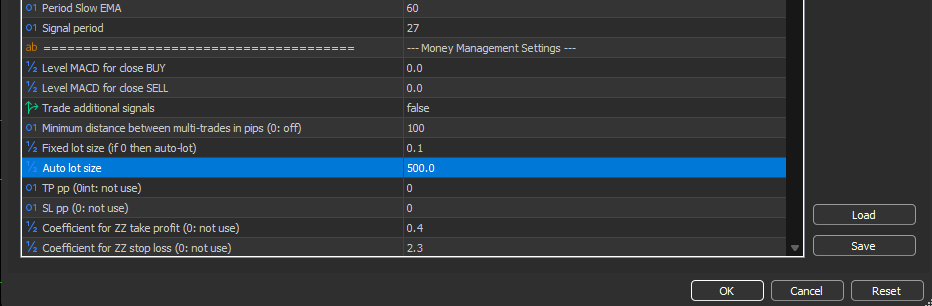
To adjust automatic money management, use the “Auto lot size” variable. Set this variable to a value between “300” and “2500”. For example, if you set the value to 500, it means the advisor will use a lot size of 0.01 for every 500 units of deposit. If you set it to 2500, the advisor will use a lot size of 0.01 for every 2500 units of deposit.
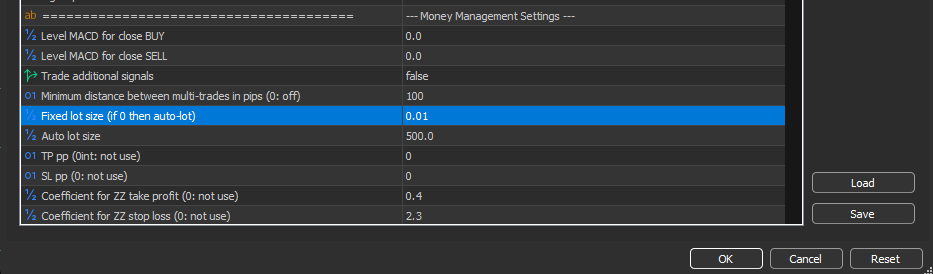
To set a fixed lot size, simply enter your desired lot size into the “Fixed lot size” variable.
Note: Setting the value to “0” will disable the fixed lot trading function, and the advisor will automatically switch to using the automated money management formula:
My Telegram group – link
My Youtube channel – link
Source link