Range Breakout Bot MT5 tutorial

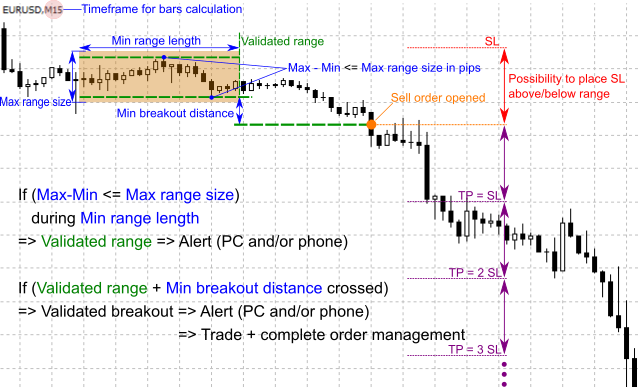
First of all, this EA alerts (if option checked) when a symbol enters into a range phase. Then, it will wait for breakout of the range (with additional filters if needed) to send an alert and/or to open an order. The main advantage of this EA is that it allows you to customize the specifications of your range.
To do this, you define the 3 following parameters:
- ‘Timeframe for bars calculation‘: the min range length will be calculated in this Timeframe.
- ‘Min range length in bars‘: the price must not go outside the range during this minimum of bars.
- ‘Max range size in pips‘: the price must move within this price range.
You can also define the breakout distance by giving a value to the ‘Minimum breakout distance in pips‘ parameter: a breakout occurs when the price crosses a minimum distance from the range.
The 4 parameters mentioned above appear in blue in the graph below:
Then, the other advantages of this EA are:
- It can automatically place Stop Loss on the other side of the range when an order is opened.
- It includes additional filters (moving average, Pivot Points, other filters can be implemented on demand).
- It has a complete management of orders (break even, trailing stop, closing before weekend, max lost/day …).
- It can work with all market watch symbols at once.
Below is the backtest of this EA for EURUSD (default settings) from 01/01/2025:

-====General settings====-
Symbols: symbols for alerts & trading (all or symbol on the chart)
There are several possibilities to choose which symbols should be scanned:
– ‘Only symbol on the chart’ : you should use this option for backtests or if you want to apply the bot on the chart symbol ;
– ‘All major forex pairs’ : the bot will scan all 28 major forex pairs (EUR/USD/GBP/CHF/AUD/NZD/JPY) ;
– ‘Market watch’ : the bot will scan all market watch symbols ;
– ‘Only symbols listed below’ : only symbols listed in the field below will be scanned
Symbols to scan or exclude: write here symbols to scan (‘Only symbols listed below’ mode) or to exclude (‘All major forex pairs’ and ‘Market watch’ mode). Symbols must be separated by a comma. Example: EURUSD,GBPUSD,EURJPY
Broker prefix (if necessary): only for brokers who use prefixes. For example, type m for mEURUSD
Broker suffix (if necessary): only for brokers who use prefixes. For example, type m for EURUSDm
If several symbols must be entered in this field, they must be separated by commas
Use Timer: define trading days and hours
Monday: alerts & trading on Mondays
Tuesday: alerts & trading on Tuesdays
Wednesday: alerts & trading on Wednesdays
Thursday: alerts & trading on Thursdays
Friday: alerts & trading on Fridays
Saturday (crypto): alerts & trading on Saturday (generally for crypto trading)
Sunday (crypto): alerts & trading on Sunday (generally for crypto trading)
Start time: start of the session
End time: end of the session
Indicators alerts: terminal and/or smartphone notifs
Sends an alert when a range is detected.
Trading alerts: terminal and/or smartphone notifs
Sends an alert when a range break is detected.
-====Range settings====-
Timeframe for bars calculation: all MT5 timeframes
Used for ‘Min range length in bars’: the number of bars will be calculated in this timeframe.
Min range length in bars: min number of bars to validate the range
If the price remains within the range size (in pips, points…) for x bars or more, the range is validated.
Minimum breakout distance in pips, points…: the breakout is validated when the price goes out of the range and reaches a minimum distance
-====Filters settings====-
-=Moving average settings=-
Use a MA: checks if price is above (buy signal) or below (sell signal) this MA
Ma timeframe: all MT5 timeframes
Ma period: period of the MA
Ma method: SMA / EMA / SMMA / LWMA
Ma applied price: CLOSE / OPEN / HIGH / LOW / MEDIAN / TYPICAL / WEIGHTED
-=RSI settings=-
Use RSI: checks RSI value before opening an order
RSI Timeframe: all MT5 timeframes
RSI period: period of the RSI filter
RSI applied price: CLOSE / OPEN / HIGH / LOW / MEDIAN / TYPICAL / WEIGHTED
RSI shift: shift of the RSI filter
Min RSI value for a buy order: the RSI must be greater than this value to validate a buy order
Max RSI value for a buy order: the RSI must be lower than this value to validate a buy order
Min RSI value for a sell order: the RSI must be greater than this value to validate a sell order
-=Pivot points settings=-
Daily PP: checks if price is above (buy signal) or below (sell signal) daily PP
Weekly PP: checks if price is above (buy signal) or below (sell signal) weekly PP
Monthly PP: checks if price is above (buy signal) or below (sell signal) monthly PP
Note: the more filters implemented, the fewer orders will be opened. If you find that there aren’t enough open orders, try disabling some filters.
-====Trading settings====-
-=General settings=-
Allow trading: if false, only alerts are operational
Magic number: must be unique if other EA are running
‘Max open orders’, ‘Max % lost/day’ and ‘Max % win/day’ are calculated from the magic number. For example, if you have 3 EAs with the same magic number, the total number of orders opened will be the sum of the orders opened in those 3 EAs.
Max open orders: max number of orders opened simultaneously (if 0, no max)
Max lost/day (in % of equity): if max value is reached, the EA open orders are closed and no other order is opened until the next day (if 0, no max)
The calculation is based on equity and not balance. In order to speed up the backtests, the calculation is done every hour during backtests, instead of every minute for a real trading session.
Max win/day (in % of equity): if max value is reached, the EA open orders are closed and no other order is opened until the next day (if 0, no max)
Same remark than for ‘Max lost/day (in % of equity)’.
Max drawdown (in % of equity): if max value is reached, the EA open orders are closed and the EA is closed (if 0, no max)
Same remark than for ‘Max lost/day (in % of equity)’, but the calculation is done every 5 minutes (for backtests and real trading sessions).
Close orders before weekend: close all EA orders on Friday
Closing time before weekend: if ‘Close orders before weekend’ is ‘true’
Use money management: if ‘true’, lot size in % balance
Fixed lots size: lot size per order (if ‘Use money management’ is ‘false’)
Lot size in %: % balance per order (if ‘Use money management’ is ‘true’)
Max spread: max allowed spread to open an order (if 0, no max spread)
Warning: if the value of the spread is too low, no order will be opened! To avoid any problem, it is recommended to set the value ‘0’ for the backtests.
Max slippage: max allowed slippage to open an order
-=SL & TP settings=-
Place SL above/below range: If ‘buy order’, SL is placed below range; if ‘sell order’, SL is placed above range
Multiple of SL for take profit: stop loss distance is multiplicated by x for take profit distance (if ‘Place SL above/below range’ is ‘true’)
SL in pips, points…: stop loss in pips, points… (if ‘Place SL above/below range’ is ‘false’)
TP in pips, points…: take profit in pips, points… (if ‘Place SL above/below range’ is ‘false’)
-=BE/TS/Grid settings=-
Break even: if ‘true’, break even is activated
Break even profit in pips, points…: triggers the break even from a certain profit in pips, points…
Trailing stop: if ‘true’, trailing stop is activated
Trail profit in pips, points…: triggers the trailing stop from a certain profit in pips, points…
Trail distance in pips, points…: distance in pips, points… between trailing stop and price
Trail step in pips, points…: step in pips, points… for the trailing stop
Open additional orders: an additional order is opened each time the profit reaches a step
Max additional orders (by symbol) : ‘Open additional orders’ must be ‘true’
It is better to have smaller lots than for main orders.
It is better to have smaller lots than for main orders.
Profit step in pips, points… to open an additional order: each time the profit reaches this step, a new order is opened
SL in pips, points… of additional orders: SL in pips, points… of the additional orders
TP in pips, points… of additional orders: TP in pips, points… of the additional orders
- Before using the ‘All major forex pairs’ mode, verify that the 28 major currency pairs are present in the “Market Watch” tab of MT5.
- It is recommended to use multi-symbol mode for alerts only. When a profitable method is found on a symbol, it is better to apply it in ‘only_symbol_on_the_chart’ mode.
- The EA works for all types of symbols but in some cases (depending on the broker), adaptations on SL and TP have to be done with certain types of symbols (other than forex and indices). In this case, settings in pips or points have to be multiplied by 10 to match the correct value. Example: for a stop loss of $10 on the Oil symbol the ‘SL in pips, points…’ parameter must take the value 100 and not 10 (x10). Tests can be carried out in backtest to find the right value.
Major forex pairs :
EURUSD / GBPUSD / USDCHF / AUDUSD / USDCAD / USDJPY / NZDUSD
EURGBP / EURCHF / EURAUD / EURCAD / EURJPY / EURNZD
GBPCHF / GBPAUD / GBPCAD / GBPJPY / GBPNZD
AUDCHF / CADCHF / CHFJPY / NZDCHF
AUDCAD / AUDJPY / AUDNZD
CADJPY / NZDCAD
NZDJPY
Source link

-香港經濟日報-即時新聞頻道-即市財經-shareandstockscom-768x432.jpeg)