Spready TripleEdge – User Manual with Live Monitoring Account
[MT5 version will come soon…]
This article contains the following sections:
- ✅ How to setup this Forex Robot
- ✅ Live Monitoring Account
- ✅ Condition to get FREE VPS
………………………………………………………………………………………
⚠️ How to setup this Forex Robot:
- Open EURUSD 5M Chart
- Enable “AutoTrading”
- Connect the EA to the chart and press OK
- Watch this video on Youtube
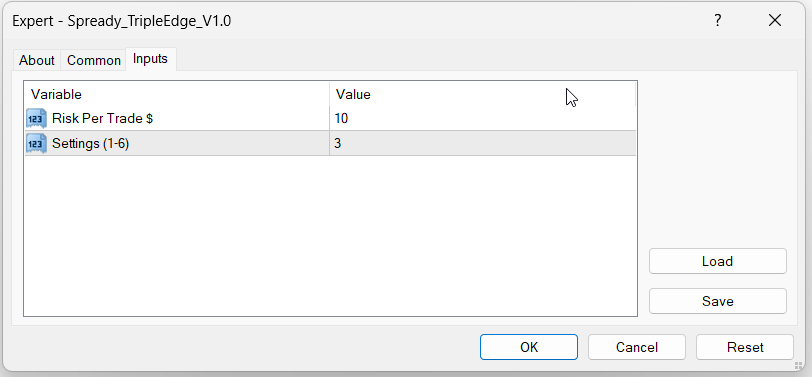
⚠️ Input configuration:
Default settings is, Risk per trade = 10$ and Settings = 3 if you have balance 500$ or more (in current version setting 3 is less risk and profitable)
There are only 2 input
Risk Per Trade : This is the amount will be risk for each trade. For every 1000$ initial balance type 10$ for Low risk. But you can start with 500$ with medium risk. After few weeks trading then you can increase risk such as 20$.
Settings : There are 5 settings. You have to type between 1-6 settings. If there is small trend then setting 1 will generate good profit and setting 5 will generate good profit if the trend is very strong. Check below Live trading results for different settings and decide which settings you want to use. One setting can be use for One MT4 account. If you want to use all 5 setting then create 5 MT4 account, each with initial balance 1000$ or more and then connect the EA for each MT4 account and specify setting.
Leverage requirement:
This EA can be use for 1:1 leverage then it will require higher initial balance. So, it is recommended to use 1:500 or higher leverage if you want to use this EA with initial balance from 500$.
Pairs :
This EA is configured for 7 pairs. All these 7 pairs should be exactly like below. Some broker uses some extra character, in that case EA will not open any order for that pair. Most of the Forex broker uses pair name similar to below:
EURUSD , GBPUSD , USDJPY , USDCHF , AUDUSD , USDCAD , XAUUSD
Forex Broker Server Time :
Most of the MT4 Forex broker server time is EET time zone. It is recommended to use any broker with EET server time to get better performance but EA can work in any Broker with different time zone. Below, top Forex broker list is given which uses EET server time.
………………………………………………………………………………………
Live Monitoring Account:
Login to MT4 using the following login and password to verify trading or click FXBlue link to check trades. Password can be updated anytime; visit this page to get latest password to login MT4 account.
………………………………………………………………………………………
Trading started from 22 October 2025.
MT4 Server : CapitalPointTrading-Demo05
| Settings | Risk Per Trade | Login | Password | FxBlue Link | Initial Balance | 22-29 October Profit |
|---|---|---|---|---|---|---|
| 1 | 20 $ | 55036613 | ForxAnalytics@2025 | Link1 | 1000 $ | 41 $ |
| 2 | 20 $ | 55036614 | ForxAnalytics@2025 | Link2 | 1000 $ | 94 $ |
| 3 | 20 $ | 55036615 | ForxAnalytics@2025 | Link3 | 1000 $ | 10 $ |
| 4 | 20 $ | 55036616 | ForxAnalytics@2025 | Link4 | 1000 $ | 229 $ |
| 5 | 20 $ | 55036617 | ForxAnalytics@2025 | Link5 | 1000 $ | 268 $ |
………………………………………………………………………………………
FREE VPS Conditions:
If you register with our partner broker using our affiliated link then you will get 3 months FREE VPS+ Free Forex robot update. Follow the following steps.
|
Step 1 |
Get the EA from this marketplace |
|
Step 2 |
Visit below link and Register Forex account via clicking over any forex broker link (If you already have account with them then use a different email to create new account; we can verify if you register via clicking our affiliated link ). |
|
Step 3 |
Create 1 or more REAL account and deposit 1000$ or more to each account (MT4, Standard Account, Leverage 1:500 or higher). |
|
Step 4 |
Send the following information via Telegram or message. MT4 Server, Login, Password. |
After getting all these information, we will activate forex robot to your account using our VPS with low risk settings which is risk per trade = 20$ and settings = 3. You just monitor account using your mobile MT4 App. We will inform you few days before VPS expiry date and then you can use your VPS for trading.
………………………………………………………………………………………
Recommendations:
It is recommended to use this EA for 5 different MT4 account, each account with 1000$ and apply 5 different settings. On average each setting generate 200$ monthly profit; which means total 1000$ monthly profit using 5 different account. This is an excellent passive income. If you don’t have confidence then first month use it in DEMO account.
………………………………………………………………………………………
Join Telegram Channel to get updates of this Robot : @ForxAnalytics
Telegram Support : @ForxAnalytics_Support
Subscribe Youtube to get details : https://www.youtube.com/@ForxAnalytics
bookmark our website for future : https://www.forxanalytics.com/
………………………………………………………………………………………