
The best automatic MT4 lot size calculator, you never thought of.

Have you ever wanted an automated way to calculate lot sizes on MT4?
If so, you’re in luck…
Hi, this is Jordan from Mql4trader.com, and I have recently decided to share one of my most prized trading possessions. For years, I struggled to calculate lot sizes while trading on the 1-minute time frame on MT4. With ticks moving so quickly, it was almost impossible to calculate the correct lot size for my desired risk.
We all know that without proper risk management, we might as well count out trading success in the long term.
So I thought to myself, “Could there be a way to code an automatic lot-size calculator that needed no manual inputs and could calculate based on something I moved around on the chart?”
Then it hit me…
I am largely a Fibonacci-based trader, and many traders have never even touched their dusty old Fibonacci Retracement tool in MT4. But I realized that this is the one tool I could turn into an automatic lot-size calculator.
I realized I could simply draw the tool and have my EA use the start point of the Fib tool—along with the current tick price—to calculate the perfect lot size based on my predefined risk percentage. And best of all, you don’t even need to use Fibonacci or understand it! You just need to use the tool as a reference point for calculating lot size.
So, if I wanted to use 2.5% risk, I would input that into my EA settings. Then, if I drew the Fib tool upward, it would automatically calculate the lot size for a buy trade—and if I drew it downward, it would automatically calculate the lot size for a sell trade!
See, we aren’t using the Fib Tool for Fibonacci, we are just using it for our Lot size calculations. Wherever the first point is is where the EA will calculate your stop loss. The EA only reads the closest Fib Tool to the current tick, so if you have multiple other Fib tools on your chart, its not a problem at all. Use it for forex, indices, commodities, crypto… you name it, it will calculate it.
This has absolutely transformed my trading. No more calculating lots manually. Now, all my lot sizes are recalculated precisely on every tick, ensuring that I never exceed my predetermined risk percentage.
I even added an optional button to automatically close trades when they reach a certain profit percentage. This is extremely helpful if you always aim for a specific reward-to-risk ratio. For example, if my risk is always 2.5% and I want my profit to always be 5%, the EA will automatically calculate and close my trade when that profit target is hit. You can set your risk and profit percentages to whatever you want and choose whether to use the InProfitExits feature.
I’ve made a simple video to show all the features here:
This is truly the one tool that every trader needs, BUT DON’T TAKE MY WORD FOR IT! Try it out yourself.
Download my “FREE Easy Lot Size Calculator for MT4” to test out, here: https://www.mql4trader.com/expert-advisors/lotsize-calculator/AutoLots-One-ClickTradingtrial.ex4
In MT4, click File-> Open Data Folder-> MQL4-> Experts then paste AutoLots-One-ClickTradingtrial.ex4 inside. Next, right click in the navigator panel expert advisors list and click refresh. If you don’t see it in the experts list, restart MT4.
You can now attach the Lot Size Calculator EA to any chart by finding it within MT4s navigator panel under expert advisors.
Simply draw your Fibonacci retracement tool to begin calculating.
If you have any questions feel free to message me at support@mql4trader.com
Or get your full version here: https://www.mql5.com/en/market/product/142902
NEWLY ADDED:
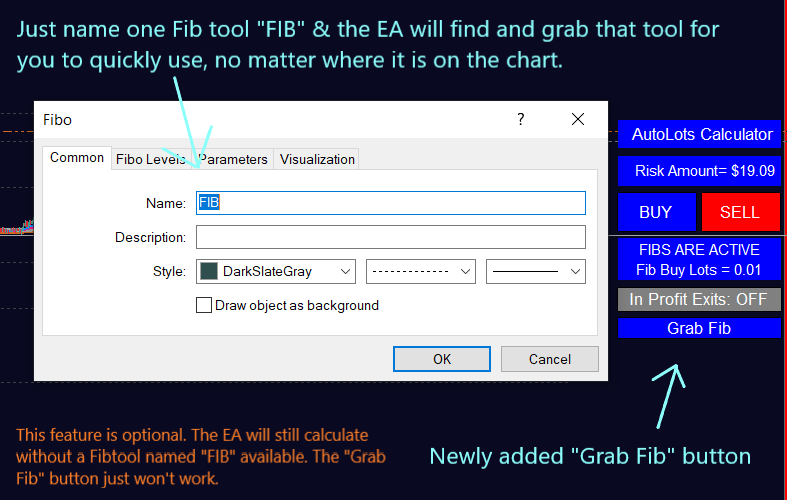
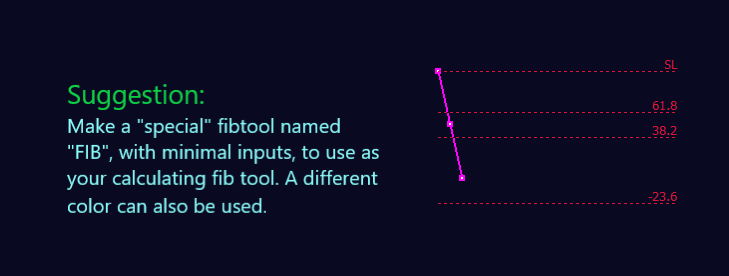
When I created the video I hadn’t added in the new “Grab Fib” button feature. You can now name one fib tool “FIB” and then use the “Grab Fib” button to automatically bring that fib tool to the front of your chart for instant use.
Source link