SIGNAL SCANNING CONFIGURATION GUIDE – MIRAGE TRADING SYSTEM EA
Video
To ensure the Mirage Trading System EA operates according to your strategy, you must correctly configure the scanning scope in the Inputs tab. Below are the 3 main operating modes:
1. Single Chart Trading Mode
Use this when you want the EA to focus only on the specific currency pair and Timeframe currently open.
-
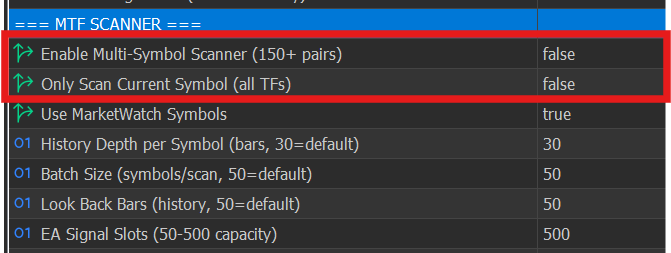
How to set up: Go to the Inputs tab and adjust the following parameters:
-
-
Result: The EA will only scan and receive signals from the active chart window you are currently viewing.
2. Multi-Timeframe Mode (Single Symbol)
Use this when you want the EA to find signals across all timeframes (M1, M5, H1, D1, etc.) for the current currency pair.
3. Multi-Symbol & Multi-Timeframe Mode (Full Market Scan)
Use this when you want the EA to automatically hunt for signals across all symbols and various timeframes simultaneously.