SCANNER KALMAN [tambangEA]
How EA Works : https://youtu.be/budUS75LKr8
MQL5 Blogs : https://www.mql5.com/en/blogs/post/768815
MT4 Version : https://www.mql5.com/en/market/product/129411
MT5 Version : https://www.mql5.com/en/market/product/129412
Scanner Kalman [tambangEA]
Problem
Many traders waste time jumping from chart to chart, trying to find which symbol and timeframe is actually moving, which signal is still fresh, and which setup is already late.
By the time a trend shift is noticed manually, the best entry is often gone.
The result is familiar:
- too many charts
- too much noise
- slow decision making
- late entries
- inconsistent execution
Solution
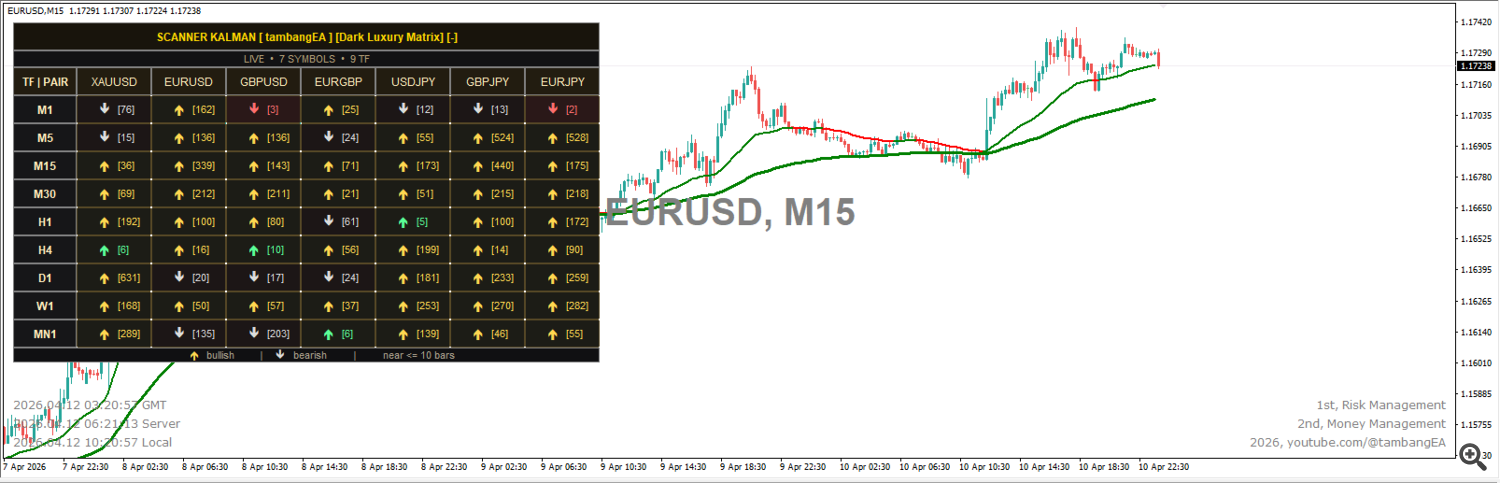
Scanner Kalman [tambangEA] is a multi-symbol, multi-timeframe trend scanner built to help you spot market direction faster and read momentum more clearly.
It combines a Kalman-based trend engine with a professional dashboard scanner, so you can monitor multiple symbols and timeframes from one chart only.
Instead of checking every chart one by one, you immediately see:
- which pairs are bullish
- which pairs are bearish
- how old the signal is
- which setups are still near/fresh
- which chart should be opened next with one click
Benefits
Save time
Monitor multiple symbols and timeframes from one compact dashboard.
React faster
See fresh signals quickly before they become late.
Trade with more structure
The scanner helps you focus on the strongest directional opportunities instead of random chart browsing.
Cleaner decision flow
Use the panel as a market map, then open the exact symbol and timeframe you want instantly.
Flexible display modes
Choose the panel style that fits your workflow:
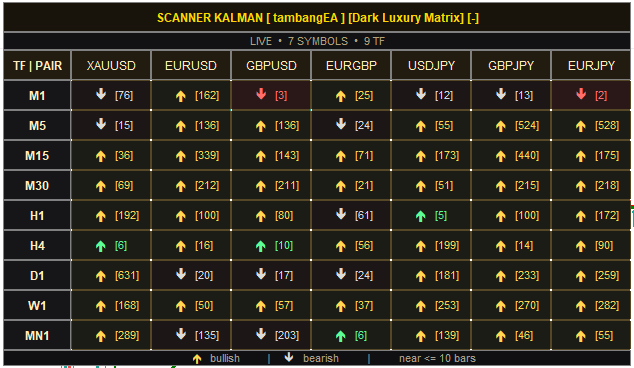
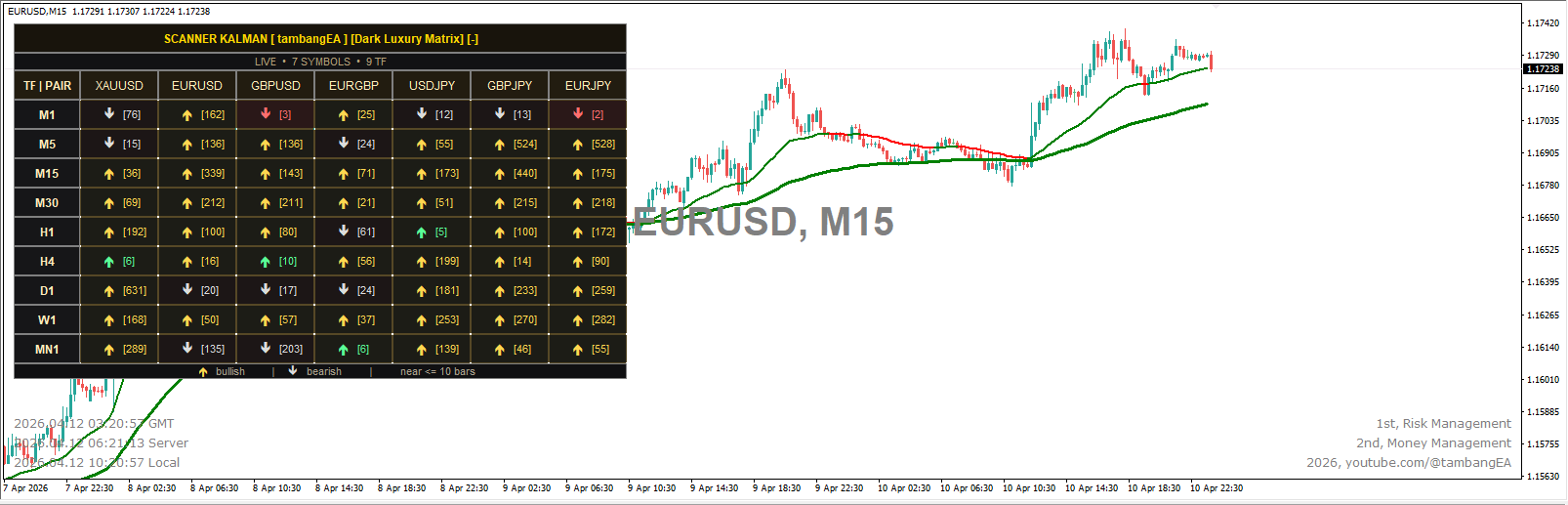
- Dark Luxury Matrix
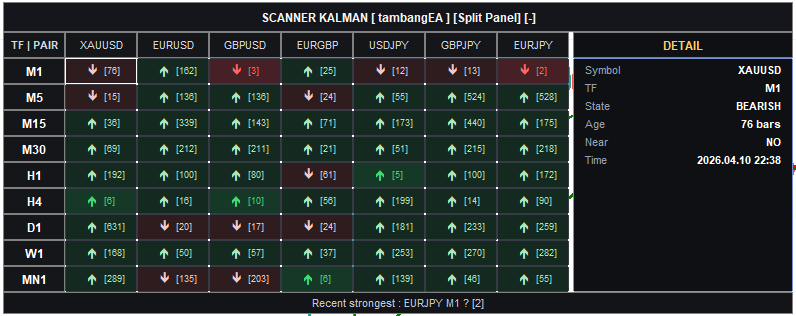
- Split Panel
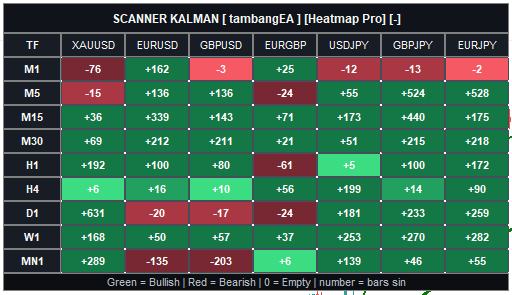
- Heatmap Pro
Better chart awareness
The indicator helps visualize trend direction directly on the chart while the scanner gives you the broader market picture.
Features
- Kalman-based trend scanner
- Multi-symbol scanning
- Multi-timeframe scanning
- Clickable dashboard
- Signal age display in bars
- Near-signal highlighting
- Dark Luxury Matrix panel
- Split Panel with detail section
- Heatmap Pro panel
- Current chart signal visualization
- Terminal, push, and email alert support
- Custom symbol list
- Custom timeframe list
- Drag-and-move panel
- Collapse / expand panel
- Professional visual style
- Theme-ready interface
- Designed for fast manual analysis
How To Use
- Attach Scanner Kalman [tambangEA] to any chart.
- Set your preferred:
- symbols
- timeframes
- panel mode
- visual theme
- alert options
- Watch the scanner table:
- bullish cells show upward direction
- bearish cells show downward direction
- the number shows how many bars ago the signal appeared
- near signals help you identify fresher opportunities
- Click any scanner cell to open that exact symbol and timeframe.
- Use the chart view to confirm structure, direction, and trend context before entering a trade.
- Repeat the process across sessions for a faster and more organized workflow.
Disclaimer
Scanner Kalman [tambangEA] is a technical analysis tool designed to assist market scanning and decision support. It does not guarantee profits and should not be considered financial advice.
Trading Forex, Gold, Indices, Crypto, and other leveraged instruments involves substantial risk. Past performance does not guarantee future results. Always use proper risk management, lot control, and personal judgment before opening any position.
The author is not responsible for trading losses, missed trades, execution issues, broker-related problems, or any direct or indirect damage resulting from the use of this product.
Source link