TradingView Script To Highlight Good Market Conditions
Before we head to the beach for a swim, we need to assess the weather.
Before we take a trade, we need to determine the market conditions.
Contents
For the purposes of this example, we will keep things simple and say that market conditions are good if these three conditions are met:
- If the price is above its 20-period simple moving average
- If RSI is between 55 and 80
- If VIX is below 25
The asset is bullish if the price is above its moving average.
Generally, when this happens, the slope of the moving average is also sloping upwards.
So to keep things simple, we are not going to check the slope.
An RSI above 55 indicates strong upside momentum.
But we don’t want to buy when it is overbought (as indicated by RSI above 80).
Under normal conditions, VIX is typically under 25.
The above suggests increased market volatility and market movements.
I prompted ChatGPT with…
“Write PineScript in Tradingview to display a green background if the 20-period simple moving average and RSI are between 55 and 80, and the price is above the 20-period simple moving average, and VIX is less than 25.”
Note that I said “20-period simple moving average” instead of “20-day simple moving average” because I wanted this indicator to work for other timeframes besides the daily chart.
I also didn’t need to specify that it was a 14-period RSI, since TradingView defaults to the 14-period RSI.
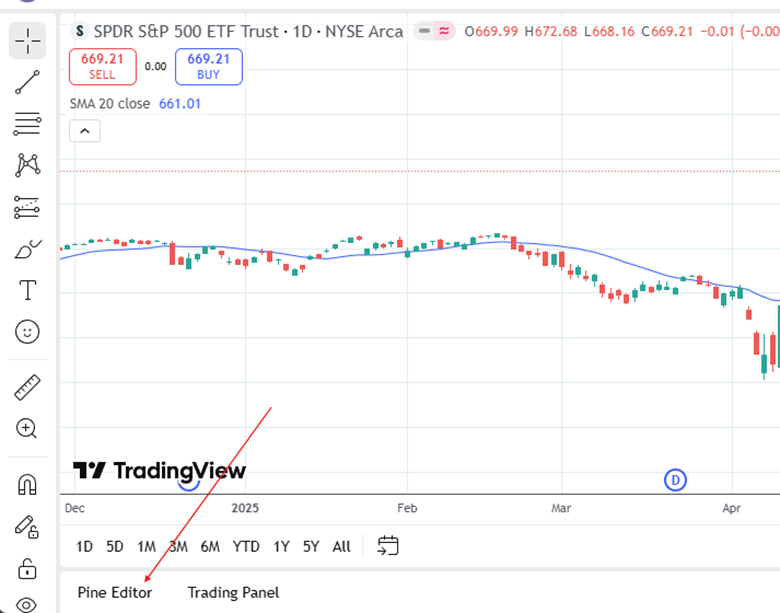
ChatGPT generated some code, which I copied and pasted into the Pine Editor panel in TradingView.
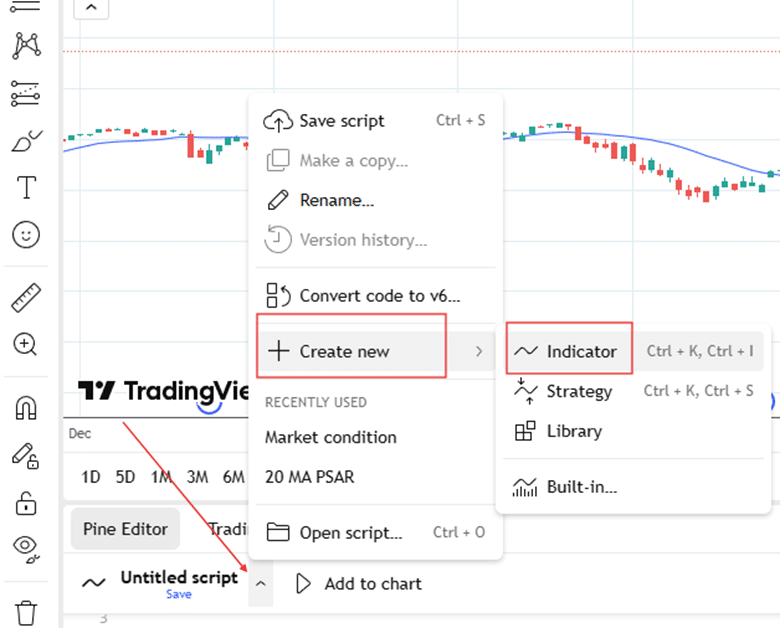
I opened the PineEditor in TradingView:
Then selected Create New Indicator:
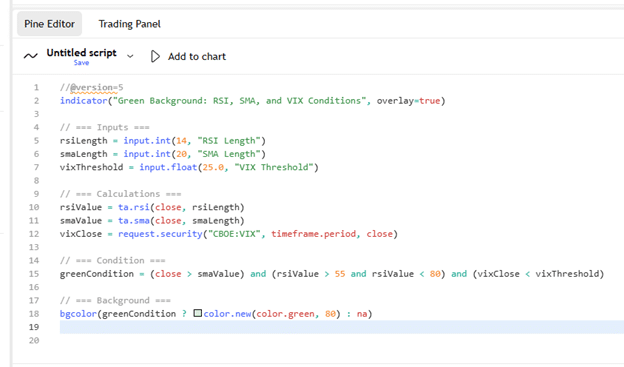
And then pasted the 18 lines of code that ChatGPT gave me…
I clicked “Add to Chart,” and the green background appeared when market conditions are good.
(I’ll show you the picture later.)
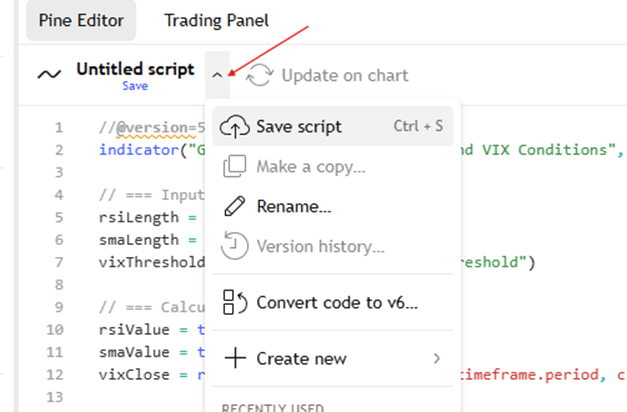
But first I want to “Save script”…
And I gave it the name “Market conditions”.
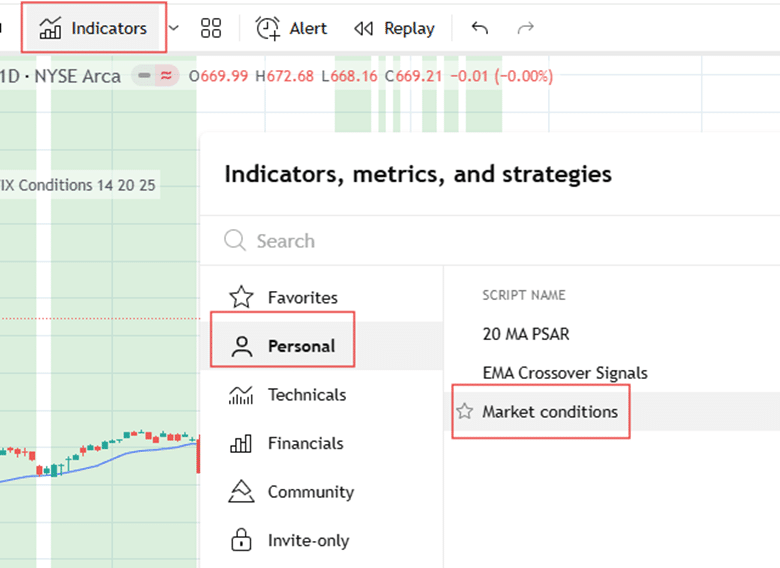
Now I can turn on this custom indicator anytime I want via the Indicators panel…
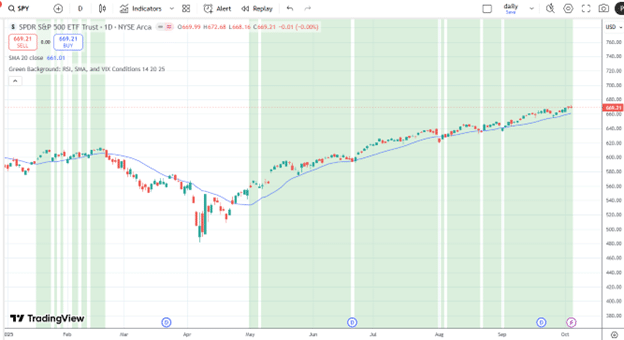
Here is how it looks in 2025, using the daily chart of SPY…
I also added the blue 20-period simple moving average to confirm that the green background appears only when the price is above it.
It appears to work quite well.
We see the price going up when the market conditions are good, as indicated by the green background.
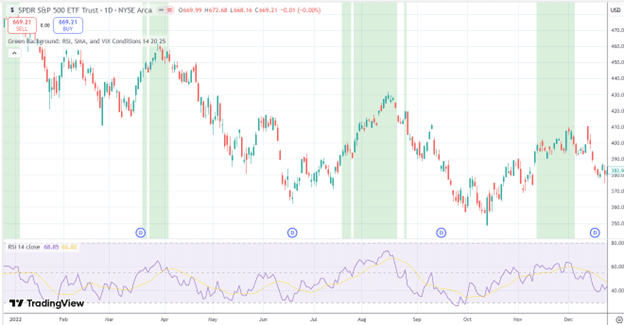
For the year 2022, it looks quite different, with much less green…
The RSI didn’t often stay above 55, so we don’t see much green background.
In general, it was a bearish year.
Traders and investors can profit by participating in the market when times are good and staying out of it when conditions are bad.
This simple custom indicator, built with ChatGPT’s help, can help us do this.
You can try prompting ChatGPT to show green market conditions based on your own metrics.
Or you can paste the 18 lines of code above into your PineScript editor and try it out.
By making code edits and experimenting, you might get as good at writing custom indicators as ChatGPT.
We hope you enjoyed this article about a TradingView script that highlights good market conditions.
If you have any questions, please send an email or leave a comment below.
Trade safe!
Disclaimer: The information above is for educational purposes only and should not be treated as investment advice. The strategy presented would not be suitable for investors who are not familiar with exchange traded options. Any readers interested in this strategy should do their own research and seek advice from a licensed financial adviser.
Source link